Full-Text Search
Introduction
Full‑text search lets you query any text based information across all experiment protocols, either locally or on the optional server. This includes all material entries (reference reactants, reagents, solvents, auxiliaries, products), comments and separator tiles, but excludes the content of embedded documents. Full-Text search is accessible from the main toolbar:
Search → Full-Text Search ...
As with all search functions, only finalized experiments are included in the results - unfinalized ones are treated as work in progress. Full-text search is case-insensitive. Clicking an experiment hit in the results opens it in the protocol for examination.
Word Boundary
For word indexing reasons, the search always starts at the beginning of a word, but doesn't need to include its end:
- Example: 'bromo', 'bromoeth' and 'bromoethane' all will find occurrences of words starting (and possibly ending) with the search term.
- However, 'bromo' will not find 'Ethylbromoacetate', since the search term is not located at the beginning of the target word.
Multi-Word
Also adjacent word combinations (phrases) can be searched:
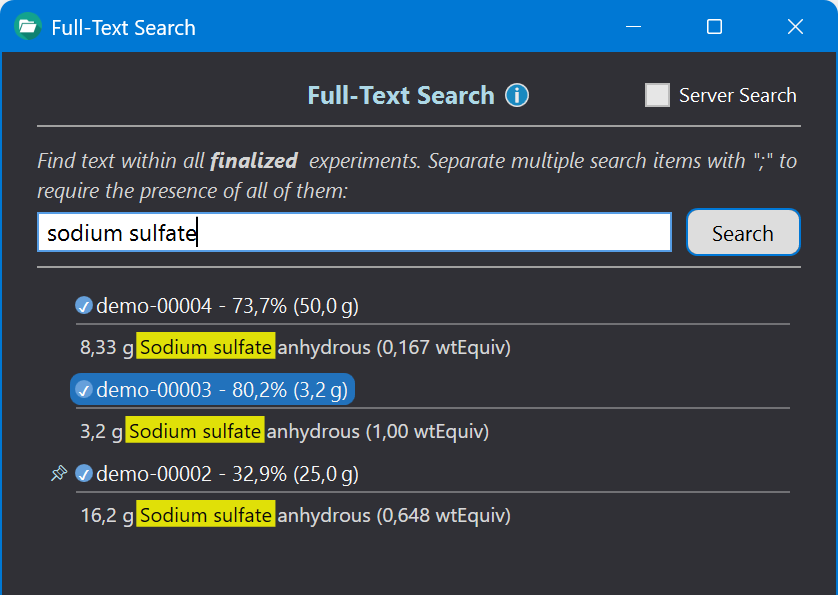
- Example: 'sodium sulfate' will find all occurrences of exactly this word combination (see above image).
- However: Isolated occurrences of 'sodium' and/or 'sulfate' will not be found.
Search Term Combinations
Search terms can be combined by separating them with ";". This means that all specified parts of the search term must be present anywhere in a protocol to produce a hit.
- Example: 'sodium sulfate; dichloromethane; stirred at RT' finds all experiments where all 3 search terms are present.